For a fun seasonal project with powerpoint- introduce
kids to 818 section (jokes & riddles), bookmark some additional Halloween jokes,
and let them make some slides. Have them save to a shared folder, then
merge the slides. Upload the class show to Slideshare
or some other service to disseminate or embed on your website, if desired.
Showing posts with label tech. Show all posts
Showing posts with label tech. Show all posts
Wednesday, October 22, 2014
PowerPoint is a Joke! a Halloween tech project

Tuesday, September 2, 2014
International Dot Day
For the first time, we will celebrate International Dot Day at Hawthorne. Dot Day is a celebration of courage, individuality, and creativity. I have sent out lots of emails to classroom teachers and fellow librarians in the district to help me celebrate. In addition to the Dot by Peter Reynolds, here are the books we will be using:
 I am very excited about blowing my student's minds with the CoLar augmented reality app and the special page they made just for Dot Day!
And here are some activity ideas I sent my teachers:

And here are some activity ideas I sent my teachers:
Thursday, May 22, 2014
Idiom Activities
The new Commom core standards indicate that students should know about figurative language, including idioms. Luckily for me, I've always loved word play, and already had a few activities under my belt (more figurative language)!

I also like to have the kids use technology to create their own illustrated idiom show. I use PowerPoint, it's an important program for kids to be comfortable with. Students LOVE the clip art, and I like not having to worry about citing sources for images from the web.
Our library has some great books about idioms, and the web has a plethora of games for kids to challenge themselves with.
http://www.literacysites.com/idiomactivities-online.htm
Tuesday, October 15, 2013
SUMDOG
One of my techie friends at a local school challenged us in a mathematical contest using SUMDOG. I'd registered a while ago, but hadn't loaded my students until now. Today I introduced it to a class of 2nd graders and a class of 5th graders and they loved it! Several of the kids wrote down their log-in information so they can play at home.
It was the perfect activity for the kids today because it's only a 3-day week, and I didn't want to start any new grade-level projects, since I won't see the other classes this week.
Kids log in and play a series of math games against other players who are logged in at the time, or a "robot". They earn coins depending on how accurate they are. I can choose how hard the problems are, or even dictate a specific type of problems (coin values, for example)


Tuesday, October 8, 2013
Halloween slide show
I know it seems simple, but many skills were at work when the 2nd graders created this Halloween movie for you. Logging in, opening a program as directed, using toolbars, using the keyboard, and phonetic awareness (The invented spelling is part of the charm!) This is a fun project to share with parents.
Digital Citizenship Projects
The fourth & fifth graders have been learning about the school Acceptable Use Policy, and digital citizenship in general. To share their learning, the students did a couple fun things...
4th Graders shared ideas on a digital bulletin board, created with Linoit. I really like this tool, because it allows all the kids to express their ideas to the group, also, they strive to think of information that hasn't yet been shared, so they are really racking their brains. Linoit is easy to use, but I wish our school didn't block access to Padlet, which is an even nicer tool!
5th graders each made a Voki to tell about a computer rule. They LOVED using Voki, and were very pleased to have their creations shared on the school web page. This was a very engaging approach to teaching this material. Here's an example:

Kindergarten Computer Skills
The Kindergartners LOVE to use the computers. I have a number of sites that I direct them to from my webpage, but I mostly like to teach them creative skills.
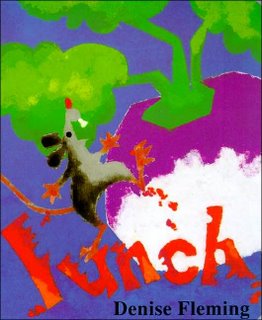
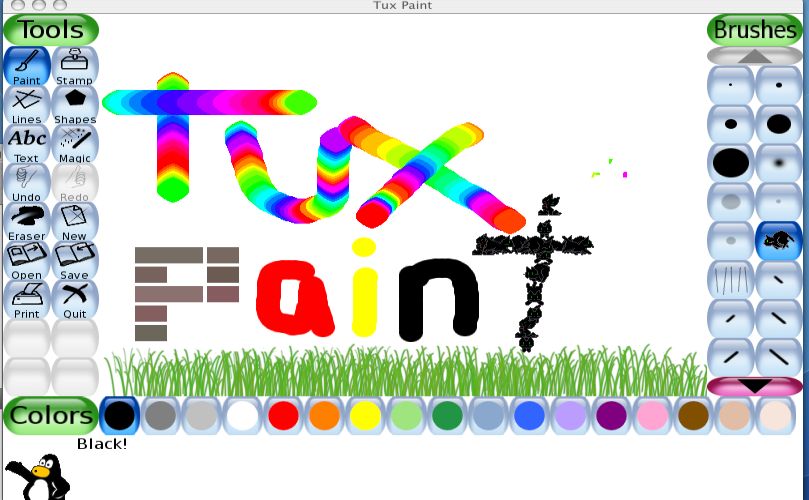
I start the year by reading Lunch, by Denise Fleming. This is a fun, simple and quick story about a little mouse who makes a colorful mess. I then show them how to make a "Mouse Mess" of their own using TuxPaint on the computer. I encourage them to use a lot of different colors and brush styles, jsut to practice using the mouse. For many of them, thisis their first experience using a computer.
 I give them each a little paper mouse to take home... a computer mouse on one side, and a storybook mouse on the other. The dots you see represent the stickers I place on the Left Click side of the mouse, so the kids know where to rest their index finger.
 A pdf of the mouse pattern can be found HERE.

Saturday, July 20, 2013
Smore : a new tool
So I have discover a new tool for making mini web pages and very cool posters. Now I am trying to decide how or why or if this might be useful in my teaching. Just to try it out, I made a page for a book I recently read, embedding a You-tube video, an image, and a quote. I must say, it looks pretty good.
One thing that would make it good for using with kids, is that there are a limited number of design options. Sometimes this is helpful for kids who might otherwise become paralyzed with indecision when faced with too many decisions (kids like myself!)
Another thing I liked is that the elements in each page are added with individual components that are modified one-at-time. This sense of incremental building is helpful for kids, in that they can manage one part of a project at a time, and won't get overwhelmed by what may seem an enormous task.
The projects can be shared on a variety of social media sites with one click, emailed, or embedded into a web page. I composed my project on the ipad, and I did have trouble getting the embed code from within Safari. So, for now I am just posting the link, and will embed using the laptop.
so here is the embedded version, you must click on it to scroll down.
One thing that would make it good for using with kids, is that there are a limited number of design options. Sometimes this is helpful for kids who might otherwise become paralyzed with indecision when faced with too many decisions (kids like myself!)
Another thing I liked is that the elements in each page are added with individual components that are modified one-at-time. This sense of incremental building is helpful for kids, in that they can manage one part of a project at a time, and won't get overwhelmed by what may seem an enormous task.
The projects can be shared on a variety of social media sites with one click, emailed, or embedded into a web page. I composed my project on the ipad, and I did have trouble getting the embed code from within Safari. So, for now I am just posting the link, and will embed using the laptop.
so here is the embedded version, you must click on it to scroll down.
Wednesday, March 13, 2013
Gathering and Display of Data
Last year, one of my former students was engaged in research for her senior project. (although how she became a senior so fast, I don't know!) She had prepared a questionnaire for this purpose, but it was in printed hard copy, which I found disturbing.
In this day and age, it is ridiculous to be gathering data on paper. First of all, it's terribly inefficient and a waste of resources. People will misplace the form either before they fill it out or after they fill it out. Trying to get the completed forms back to the originator can be a problem as well, and that is all before the data is "crunched" in a spreadsheet, or worse, tabulated by hand.
It's so very easy to create forms online to gather data. I LOVE Google forms, and the different ways I can author and finesse the behavior of the questionnaire is amazing. There are also lots of sites online that allow a student to create simple polls without any sort of account.
This week, my students will be taking a poll called "My Voice" from Pearson Education. I would be willing to bet that my district paid quite a bit for this 50 question survey that I could have put together in less than an hour on Google forms, and I could have customized it... no generic questions.
When my students finish the poll this week, I plan on showing them how they too, can create online forms to collect data. With luck, none of them will be issuing paper questionnaires for their senior projects, or any other data quest that they may need to do in the future. I will have them embed their forms into their blogs. I know they will love this activity and hopefully understand how the tools can be applied in real life.
In this day and age, it is ridiculous to be gathering data on paper. First of all, it's terribly inefficient and a waste of resources. People will misplace the form either before they fill it out or after they fill it out. Trying to get the completed forms back to the originator can be a problem as well, and that is all before the data is "crunched" in a spreadsheet, or worse, tabulated by hand.
It's so very easy to create forms online to gather data. I LOVE Google forms, and the different ways I can author and finesse the behavior of the questionnaire is amazing. There are also lots of sites online that allow a student to create simple polls without any sort of account.
This week, my students will be taking a poll called "My Voice" from Pearson Education. I would be willing to bet that my district paid quite a bit for this 50 question survey that I could have put together in less than an hour on Google forms, and I could have customized it... no generic questions.
When my students finish the poll this week, I plan on showing them how they too, can create online forms to collect data. With luck, none of them will be issuing paper questionnaires for their senior projects, or any other data quest that they may need to do in the future. I will have them embed their forms into their blogs. I know they will love this activity and hopefully understand how the tools can be applied in real life.
Wednesday, March 6, 2013
Word Clouds
In Portland, I bought a fun book full of ideas for teaching Language Arts with fun technology tools. One of the suggested activities is to have students visualize their use of language by pasting their writing into word cloud generators. In the past, Ive noticed that many of the word cloud generators on line are BLOCKED for my students by the district filter.
I expect the sites are blocked because they have galleries, and some users use questionable language when making their clouds. Blocking the sites for this reason seems weak to me. All my students that are old enough to use these tools have certainly encountered swear words before. They understand that they don't use that language just because someone else perhaps does. Kids are smarter than that. Online, just like in real life, encountering inappropriate content is a matter of "when", not "if".
This is why, when I teach about about going online, I explicitly tell them what to do and how to behave.
Enough about my beef with the internet filter. This week I'm going to see which of the word cloud sites are unblocked, and show the kids how to use them. I am hoping that they can paste their word art into their blogs. I will give the students this list of word cloud generators to try, and we will see what we will see!

I expect the sites are blocked because they have galleries, and some users use questionable language when making their clouds. Blocking the sites for this reason seems weak to me. All my students that are old enough to use these tools have certainly encountered swear words before. They understand that they don't use that language just because someone else perhaps does. Kids are smarter than that. Online, just like in real life, encountering inappropriate content is a matter of "when", not "if".
This is why, when I teach about about going online, I explicitly tell them what to do and how to behave.
Enough about my beef with the internet filter. This week I'm going to see which of the word cloud sites are unblocked, and show the kids how to use them. I am hoping that they can paste their word art into their blogs. I will give the students this list of word cloud generators to try, and we will see what we will see!
Monday, March 4, 2013
Treasure State Nominee Voicethread

I like to create a Voicethread, where students can record their thoughts about the books as we go along. I feel that it is very good practice for students to use technology to develop their thinking and speaking skills. This project is open to the public, so if you'd like to leave a comment on the thread, we would welcome your addition!
I have found that Voicethread also has a nice app for ipad or ipods. It's super easy to record video on the mobile gadgets. I have found however, that one must create the original thread on their regular website, or the audio might not save properly for some reason. Not a problem, but I had to find out the hard way.
Monday, November 26, 2012
Wants and Needs - a story and webtivity for the season
When it gets to be close to Thanksgiving, I have a favorite lesson I like to use with my 3rd or 4 th graders. I read One Grain of Rice, by Demi. This book explores many themes, from the mathematical concept of geometric growth, to hunger, crop dependence, and famine. The students are always astonished at how a single grain of rice, doubled each day, can become a monumental quantity.
It’s always a good idea to bring students a simple way they can make a difference in the world. The site FreeRice.com donates rice as the students play a game of vocabulary, simple math, or other subjects. The game adjusts in difficulty level depending on how many questions are answered correctly. It’s quite an addictive game!
The book, followed by introducing and playing the associated game, is a two-period plan. Many students will go home and play. They love to report how much rice they donated.


It’s always a good idea to bring students a simple way they can make a difference in the world. The site FreeRice.com donates rice as the students play a game of vocabulary, simple math, or other subjects. The game adjusts in difficulty level depending on how many questions are answered correctly. It’s quite an addictive game!
The book, followed by introducing and playing the associated game, is a two-period plan. Many students will go home and play. They love to report how much rice they donated.
Subscribe to:
Posts (Atom)